Datacenter HTTPS proxies on IPv4 from IPrazon. The channel to the proxy is encrypted over TLS, a fit where traffic confidentiality matters. The package includes HTTPS, HTTP and SOCKS5, rotation, unlimited traffic, 200+ countries. Free trial up to 2 hours.
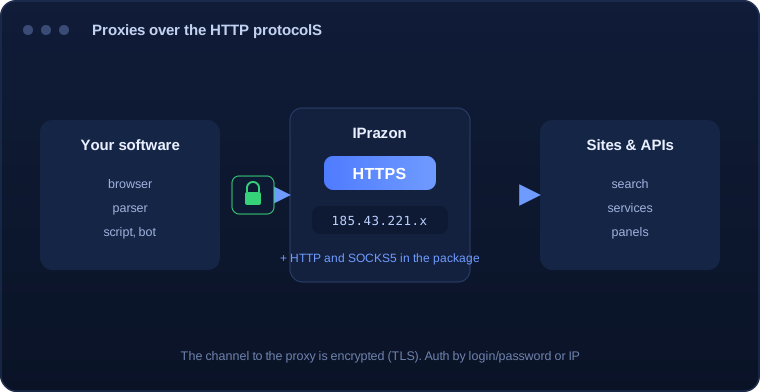
An HTTPS proxy is an HTTP proxy with an encrypted channel: the connection between your program and the proxy server is protected over TLS. Data on this segment travels encrypted, which matters when traffic is sensitive.
In compatibility an HTTPS proxy is on par with HTTP: browsers, parsers, scripts and antidetect browsers all understand it. The difference is the protected channel to the proxy, and the request to the site itself still goes through a proxy address from the proxy pool.
An HTTPS proxy at IPrazon is the same datacenter IPv4 pool reached over an encrypted tunnel. The proxy opens a CONNECT tunnel and passes TLS through untouched, so it never sees inside your session. HTTP and SOCKS5 ride in the same package, so the protocol follows the task.
Setup is as simple as HTTP and takes a couple of minutes:
If your software uses a string like https://login:pass@host:port, use it to connect.
| Parameter | Value |
|---|---|
| Protocol | HTTPS over HTTP CONNECT, TLS traffic passes through without decryption |
| Output format | IP:PORT is the main one. IP:PORT:LOGIN:PASS is the second option |
| Where to enter | The HTTPS proxy field in a browser or client: host and port |
| Encryption | Your connection to the site stays encrypted end to end |
| Pool type | Private datacenter IPv4 |
| Threads | Up to 3000 depending on plan |
| Traffic | Unlimited |
| Addresses live | 12,000 IPs, rotation runs automatically |
| Connection | Bind your IP in the dashboard for the IP:PORT format |
| Test | Free test up to 2 hours |
One package covers HTTP, HTTPS and SOCKS5, so you pick the protocol per task with no plan change.
A plain HTTP proxy reads the request, but that does not work with an encrypted connection: the contents are sealed before the proxy ever sees them. So a separate method is used, CONNECT. The software asks the proxy to open a tunnel to a host and port, and after the reply the server stops parsing anything and simply carries the bytes.
Inside that tunnel the client and the site negotiate encryption directly, with the proxy out of the loop. Your software validates the certificate, only the two ends hold the keys, and the proxy sees just the host name during setup plus the volume of bytes passed.
The practical takeaway: an HTTPS proxy does not decrypt traffic and cannot alter it. If some middleman is showing you the contents of an encrypted page, it is substituting the certificate, and that is a different arrangement entirely.
It helps to separate two legs. The first runs from your program to the proxy, the second from the proxy to the site. CONNECT covers both at once, because the tunnel passes straight through and encryption is established between the end points.
What stays visible is worth knowing. The host name goes across in the open during setup, since the proxy has to know where to open the tunnel. Traffic volume and request timing are visible too, while the page path, the parameters, the headers and the body are all sealed.
A limit follows from this. Channel encryption protects data in transit, but it has no bearing on how a site judges the behaviour of your software: request rate, order of actions, consistency of parameters. Those are separate layers and one does not stand in for the other.
A secure connection starts with an exchange of parameters. The client sends the proxy list of ciphers, protocol versions and extensions it supports, and the server picks a workable combination. That exchange happens before encryption, so its composition is visible from outside.
The parameter set itself is fairly stable and differs between programs: a browser, a Python script and a system library each assemble it their own way. As a result the handshake alone reveals what class of software made the request, without looking at the contents at all.
The proxy does not alter those parameters: inside a tunnel it carries the handshake as is, between your client and the site. Changing the proxy address therefore has no effect on how your TLS profile looks.
The practical conclusion for data collection: if requests leave from different addresses but with an identical TLS profile and identical headers, they still add up to one recognisable trace. Variety of addresses works alongside variety of clients, not instead of it.
At the start of a secure connection the client states the host name it is reaching. That extension is called SNI, and it exists so a server hosting several sites on one proxy address knows which certificate to present.
The catch is that this field travels before encryption is established, in the clear. The domain name is therefore visible to the proxy and to any observer on the path, even though the rest of the request contents are already sealed.
Working through an HTTPS proxy the picture is this: the proxy knows the host name in any case, because that is exactly where it opens the tunnel on a CONNECT command. What stays hidden from it is everything inside: the page path, parameters, headers, body and response.
Which draws an honest boundary. An HTTPS proxy seals the contents of the exchange and replaces the source address as far as the site is concerned, but the fact of reaching a particular domain stays visible at connection level.
HTTPS proxies are chosen where a protected channel matters:
Worth saying plainly: TLS encryption is not an anti-fraud shield. Encryption protects the channel to the proxy. HTTPS from a datacenter pool is built for encrypted API calls, monitoring and scraping.
HTTPS traffic goes through hardware we own: low latency on the TLS handshake, steady addresses, uptime without drops. New IPs arrive by rotation on schedule or on demand.
Volume is never billed on any package. Behind HTTPS sits the same 12,000-address IPv4 base across 200+ countries, and the Corporate plan lifts the ceiling to 3000 concurrent threads, enough for TLS-heavy API polling.
One package, three protocols: HTTPS for encrypted endpoints, HTTP for plain ones, SOCKS5 when DNS must stay inside the tunnel. Authorize by login and password, or bind your IP in the dashboard and drop credentials entirely.
I took HTTPS proxies where an encrypted channel mattered. Runs stably, good speed, I set rotation myself.
Handy that HTTPS, HTTP and SOCKS5 are in one package. Ran the 2-hour trial before paying, all good.
I use it for APIs and panels over a secure connection. Unlimited traffic and Telegram support are exactly what I needed.
Try it against a real TLS endpoint first, the free trial runs up to 2 hours. Point your client at the HTTPS proxy and watch handshake time and stability under your own load.
An HTTPS proxy encrypts the channel between your software and the proxy over TLS, while HTTP leaves that segment unencrypted. In compatibility they are the same, and both are in the proxy package.
There is nothing to buy on top. All three protocols ship with every package, and switching between them costs neither a fee nor a plan change.
HTTPS runs over the same datacenter IPv4 pool of 12,000 addresses across 200+ countries. Access is private and addresses are never sold one by one.
The channel between your software and the proxy is encrypted. From there the request goes to the site by its own protocol, so if the site is on HTTPS, the connection stays protected end to end.
Both methods are available: by login/password or by binding your IP.
For encrypted API calls, monitoring and parsing, yes. HTTPS from a datacenter pool is built for encrypted API calls, monitoring and scraping.
Two hours of free access, no card. Wire the HTTPS proxy into your client and judge it on your own endpoints before any payment.