Proxies for A-Parser — Multithreaded Parsing | IPrazon
Proxies for A-Parser

Proxies for A-Parser

Datacenter IPv4 and SOCKS5 proxies for A-Parser. A rotating pool handles multi-threaded SERP and site parsing, unlimited traffic, 200+ countries. Free trial up to 2 hours on your tasks.

Pricing for A-Parser proxies

Free Trial
$0
up to 2h
  • 12,000 IPs
  • Unlimited Traffic
  • 2000 Threads
  • Global Pool
Start testing
Starter
$20
24h
  • 12,000 IPs
  • Unlimited Traffic
  • 1000 Threads
  • Global Pool
Buy
MOST POPULAR
Business
$100
week
  • 12,000 IPs
  • Unlimited Traffic
  • 1000 Threads
  • Global Pool
Buy
Advanced
$300
month
  • 12,000 IPs
  • Unlimited Traffic
  • 1000 Threads
  • Global Pool
Buy
Enterprise
$600
month
  • 12,000 IPs
  • Unlimited Traffic
  • 3000 Threads
  • Global Pool
Buy
About

What proxies for A-Parser are used for

A-Parser is a multi-threaded parser for collecting data from search results, sites and services. It runs in tens and hundreds of threads at once, giving high collection speed.

But collecting from a single IP makes platforms apply rate limits fast, and the parser hits a cap. Proxies spread threads across different addresses, so A-Parser keeps high speed without stalls.

Datacenter proxies fit this perfectly: parsing results and sites is technical data collection. The more proxy addresses in the proxy pool, the lower the load per proxy address and the more stable the collection.

Setup

How to connect a proxy to A-Parser

A-Parser accepts proxy lists in its settings:

  1. Copy the list of addresses from your IPrazon dashboard. The main format is IP:PORT, or IP:PORT:LOGIN:PASS if you need it.
  2. Open the proxy settings in A-Parser (Proxy checker / proxy lists).
  3. Paste the list and pick a protocol, either SOCKS5 or HTTP.
  4. Set the number of threads for your plan and task.
  5. Start parsing: threads are spread across the proxy pool.

You set the number of threads and the request rate in A-Parser for the target platform.

Specs

What proxies you need for scraping in A-Parser

ParameterValue
List formatIP:PORT is the main one, pasted as a single column. IP:PORT:LOGIN:PASS when you need login access
Where to paste the listA-Parser proxy settings: Proxy checker / proxy lists
Protocol on pasteSOCKS5 or HTTP, picked in the same window
Threads for SERP scrapingSet inside A-Parser per target site, pool ceiling is up to 3000
Collection volumeUnlimited traffic: marketplaces and large semantics are not metered
Addresses live12,000 IPs, rotation runs automatically inside the proxy pool
ConnectionBind your IP in the dashboard for the IP:PORT format
Try before payingFree test up to 2 hours

Request rate to the target site is set in A-Parser itself, and the proxy pool does not cap it.

Sizing

How many proxies multithreaded collection needs

Thread count in A-Parser and address count in the proxy pool are different quantities, and confusing them is expensive. Threads decide how many requests run at once, addresses decide how many sources that load is spread across.

Count from the load per proxy address. If the safe rhythm for a target is, say, one request every few seconds, then at twenty threads the load has to land on at least as many addresses, otherwise each one takes a share above the threshold.

Hence the rule: work out the permitted rate per IP first, then the total collection speed you need through proxies, and the gap between them gives the proxy pool size. Raising threads without growing the proxy pool runs into blocks.

Diagnostics

Common proxy connection errors and how to catch them

A proxy connection refusal almost always comes down to four causes, and checking them in this order saves time. First: the wrong proxy type is selected, HTTP where SOCKS5 is needed or the other way round. Second: the port does not match the one issued.

The third cause sits in the format. If the list is issued as IP:PORT with no login, access works by binding, and requests only go through from the address you registered. Changing machine, network or outbound interface returns a refusal on a perfectly working list.

Fourth: a typo in the login or password, most often a trailing space picked up when copying the string. Check separately that A-Parser actually routes traffic through the proxy: a connection is confirmed by the source address on an IP test service.

Rotation

How to set up proxy switching in A-Parser

Address switching is configured in two places and mixing them up causes trouble. The first is the proxy pool side: the address changes on its own by schedule or per request, and A-Parser needs to do nothing. The second is the software side: you feed different strings from the list to different tasks yourself.

The first option suits uniform work where no state is held between requests. The list is connected once and new proxy addresses arrive automatically, with no intervention needed.

The second option is what you need when presets work with different targets and the safe rate differs for each. The address is then pinned explicitly and you decide when to change it: after a cycle finishes, after a number of processed items, or on a timer.

Running both modes on one task is usually harmful. If the proxy pool rotates on its own while the software cycles through the list in parallel, behaviour becomes unpredictable and some requests leave from addresses you did not intend.
Distribution

How to spread proxies across presets in A-Parser

The base rule: load has to fall evenly across the proxy pool, otherwise some addresses burn out ahead of the rest. So it is better to assign presets to addresses deliberately than to let the software grab whichever comes first.

When tasks differ in weight, count by intensity. One heavy process can produce more requests than five light ones, and it makes sense to give it dedicated addresses so it does not crowd the others.

Keeping a small reserve of addresses that are not permanently occupied pays off. It comes in useful when part of the proxy pool starts meeting checks: you move the affected tasks onto fresh addresses without stopping everything.

And finally, record which task ran from which address. Without that, when refusals appear there is no way to tell whether the cause is a specific address, the task settings or the platform itself.

Use cases

What tasks people use A-Parser proxies for

A-Parser with proxies is used where fast bulk collection is needed:

  • Parsing results from Yandex and Google in many threads.
  • Collecting site data: prices, catalogs, content.
  • Parsing marketplaces for price and assortment monitoring.
  • Collecting SEO data and semantics at large volumes.

Mind platform limits and rules, you set the request rate and threads in your own software.

Infrastructure

Why IPrazon datacenter proxies fit A-Parser

The datacenter pool gives up to 3000 threads on the top plan, stable fast addresses and rotation: queries spread across 12,000 IPs, the load per proxy address is lower.

Traffic is unlimited on all packages, parsing volume is not capped by traffic, which matters for systematic collection. The pool covers 200+ countries.

SOCKS5 and HTTP are in the package, with login/password or IP authorization. A-Parser works with both.

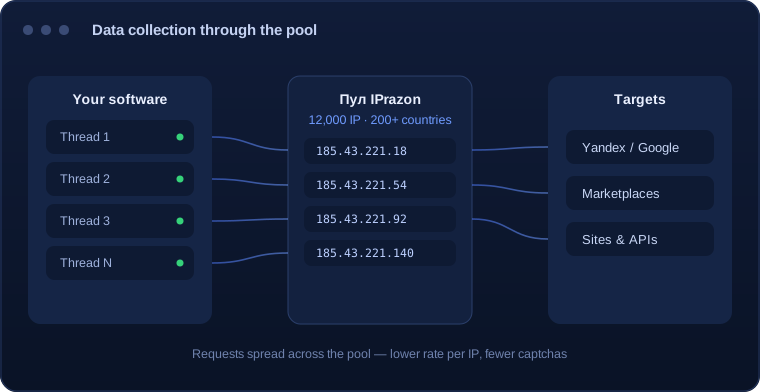
A-Parser threads spread across the IPrazon pool
A-Parser threads spread across the proxy pool of 12,000 addresses
Reviews

Reviews of A-Parser proxies

★★★★★

I parse results in 500 threads at large volumes. The proxy pool keeps the speed, no stalls. On my previous service I kept hitting limits.

D
David C.data specialist
★★★★★

Took the 2-hour trial and ran my A-Parser tasks, speed and stability were fine. Unlimited traffic is the key.

L
Lena H.webmaster
★★★★★

I collect marketplace prices regularly. Low captcha at volume, support replies fast.

M
Mateo G.analyst
Free trial

Test the proxies on your A-Parser tasks

Before you pay we offer a free trial up to 2 hours. Run your A-Parser tasks on the proxy pool and check the speed and stability of multi-threaded collection.

Get a free trial

FAQ

A-Parser proxy FAQ

How many threads does the proxy pool support?

Up to 3000 threads on the top plan. Threads are spread across a proxy pool of 12,000 addresses with rotation.

How do I add proxies to A-Parser?

In the proxy settings paste a list of addresses as IP:port:login:password and pick SOCKS5 or HTTP. Both are in the package.

Is there a traffic limit?

No, traffic is unlimited on all packages, parsing volume is not capped.

Do the proxies work for SERP parsing?

They do. The rotating datacenter pool is optimal for collecting Yandex and Google results and parsing sites.

Can I parse marketplaces?

The pool fits collecting prices, catalogs and assortment. You set the request rate in A-Parser for the platform rules.

Which protocols are supported?

SOCKS5 and HTTP, both are in the package, switch per task.

Can I test it?

A free trial is available up to 2 hours. Run your A-Parser tasks on the proxy pool before you pay.

Source: https://iprazon.com/tools/a-parser · © IPrazon Network. When copying, an active link to the source is required.