Proxies for Dolphin Anty from a datacenter pool of IPv4 and SOCKS5. Stable addresses for multi-profile work, rotation, unlimited traffic, 200+ countries. Free trial up to 2 hours on your profiles.
Dolphin Anty is an antidetect browser for working with several profiles at once. Each profile gets its own set of parameters: user-agent, screen resolution, fonts, WebGL, time zone. To a website this looks like requests from different devices.
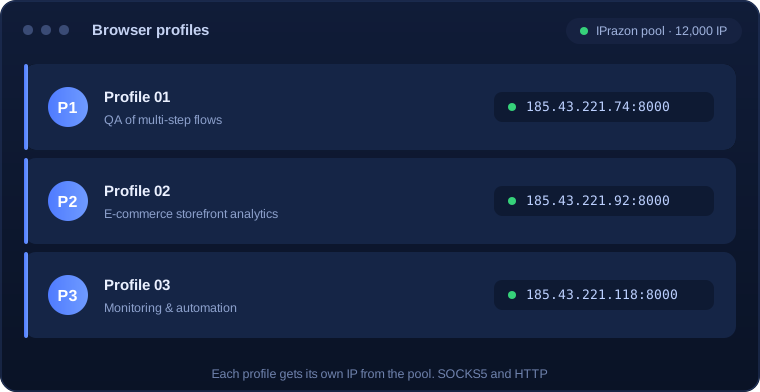
But a unique fingerprint is only half the job. If all profiles go online from the same IP, the platform still links them by address. That is why each profile gets its own proxy: then profiles appear as independent connections from different IPs.
Dolphin detects datacenter proxies right away: you paste the access string into the profile settings, pick a protocol, and the address is assigned to the profile. From then on the profile always goes out through that IP, predictable and stable.
Setup takes a couple of minutes and needs no server configuration on your side:
For teams it is convenient to distribute profiles across proxy pool addresses and rotate IPs on schedule or on demand, which lowers the load on each address.
| Parameter | Value |
|---|---|
| Profile format | IP:PORT is the main one. IP:PORT:LOGIN:PASS when the profile needs a login |
| Where to enter | Dolphin Anty profile, proxy block: host, port, login, password |
| Type in profile | SOCKS5 or HTTP, both are in the package |
| Connection check | The Check button: Dolphin shows the country and status |
| Per profile | A saved profile always goes out through the address you picked |
| QA and e-commerce | Unlimited traffic: storefront checks and multi-step flows with no extra fees |
| Addresses live | 12,000 IPs, rotation runs automatically inside the proxy pool |
| Connection | Bind your IP in the dashboard for the IP:PORT format |
| Try before paying | Free test up to 2 hours |
No server setup on your side, the profile is ready to work right after you save it.
The starting point is simple: one profile should go out consistently through one proxy and through one proxy and through one proxy and through one proxy and through one proxy and through one proxy and through one proxy and through one proxy and through one proxy and through one proxy and through one proxy and through one proxy and through one proxy and through one proxy and through one proxy and through one proxy and through one proxy and through one proxy and through one proxy and through one proxy and through one proxy and through one proxy and through one proxy and through one proxy and through one proxy and through one proxy and from one proxy address, otherwise the separation loses its point. So the lower bound is as many addresses as there are profiles running at the same time.
The gap between those two numbers is usually wide. Out of a hundred created profiles only a handful are active at any moment, so the proxy pool is sized for peak concurrency. The practical way to count it: look at how many windows are genuinely open in your busiest hour and leave a small margin above that.
The second factor is session length. If a profile runs for hours, the address is occupied all that time. If the task is short, one proxy address serves several profiles in sequence and the total number you need falls.
A refusal on connection almost always comes down to four causes, and checking them in this order saves time. First: the wrong proxy type is selected, HTTP where SOCKS5 is needed or the other way round. Second: the port does not match the one issued.
The third cause sits in the format. If the list is issued as IP:PORT with no login, access works by binding, and requests only go through from the address you registered. Changing machine, network or outbound interface returns a refusal on a perfectly working list.
Fourth: a typo in the login or password, most often a trailing space picked up when copying the string. Check separately that Dolphin Anty actually routes traffic through the proxy: a connection is confirmed by the source address on an IP test service.
Address switching is configured in two places and mixing them up causes trouble. The first is the proxy pool side: the address changes on its own by schedule or per request, and Dolphin Anty needs to do nothing. The second is the software side: you feed different strings from the list to different tasks yourself.
The first option suits uniform work where no state is held between requests. The list is connected once and new proxy addresses arrive automatically, with no intervention needed.
The second option is what you need when a profile holds an authorization and must go out from one address for the whole session. The address is then pinned explicitly and you decide when to change it: after a cycle finishes, after a number of processed items, or on a timer.
Running both modes on one task is usually harmful. If the proxy pool rotates on its own while the software cycles through the list in parallel, behaviour becomes unpredictable and some requests leave from addresses you did not intend.
The base rule: load has to fall evenly across the proxy pool, otherwise some addresses burn out ahead of the rest. So it is better to assign profiles to addresses deliberately than to let the software grab whichever comes first.
When tasks differ in weight, count by intensity. One heavy process can produce more requests than five light ones, and it makes sense to give it dedicated addresses so it does not crowd the others.
Keeping a small reserve of addresses that are not permanently occupied pays off. It comes in useful when part of the proxy pool starts meeting checks: you move the affected tasks onto fresh addresses without stopping everything.
And finally, record which task ran from which address. Without that, when refusals appear there is no way to tell whether the cause is a specific address, the task settings or the platform itself.
Datacenter proxies in Dolphin fit technical and analytical scenarios where profile stability and speed matter:
The datacenter pool is built for technical profiles: QA of multi-step flows, analytics, e-commerce checks and work with panels and APIs.
The proxy pool runs on our own hardware: stable fast addresses, low latency, uptime without drops. For multi-profile work this is critical, a profile must not lose connection mid-scenario.
Rotation delivers new IPs on schedule or on demand, and traffic is unlimited on all packages: profile workload is not capped. The pool holds 12,000 addresses across 200+ countries.
SOCKS5 and HTTP are in every package, with login/password or IP authorization. That is enough to assign each profile its own address and keep profiles independent.
I run 40+ profiles in Dolphin for QA and analytics. The IPs do not drop, I set rotation on a schedule. On my previous service profiles kept losing connection, here it is stable.
We took the 2-hour trial before paying and ran our scenarios, almost no captcha at our volume. Support replies fast on Telegram, no fluff.
A team of six, each with their own profiles on different IPs from the proxy pool. Handy that SOCKS5 and HTTP come in the package, nothing extra to buy.
Before you pay we offer a free trial up to 2 hours. Connect the proxy pool to several Dolphin Anty profiles and check stability and speed on your own task.
Copy the IP:port:login:password access string from your dashboard, open a profile in Dolphin, choose SOCKS5 or HTTP in the proxy section and paste the data. Click Check and save, the address is assigned to the profile.
Dolphin supports both, and both are in the package. SOCKS5 is often used for stable profiles and socket connections, HTTP for maximum compatibility.
For technical profiles, QA, analytics and monitoring, they do. The datacenter pool is built for that kind of multi-profile work.
The package gives access to the proxy pool: you distribute addresses across profiles yourself, and rotation delivers new IPs on schedule or on demand. There is no limit on the number of profiles.
As many as you need: you distribute the proxy pool of 12,000 IPs across profiles yourself. There is no hard limit on the number of profiles, scale by your workload.
It is your choice. You can keep a stable address per profile or enable rotation, then a new IP is delivered on schedule or on demand.
A free trial is available up to 2 hours. Connect the proxy pool to several profiles, run your scenarios and check stability and speed before you pay.