Anonymous proxies on datacenter IPv4 from IPrazon. The site sees the proxy address while your real IP stays hidden. Private pool, rotation, unlimited traffic, 200+ countries. Free trial up to 2 hours.
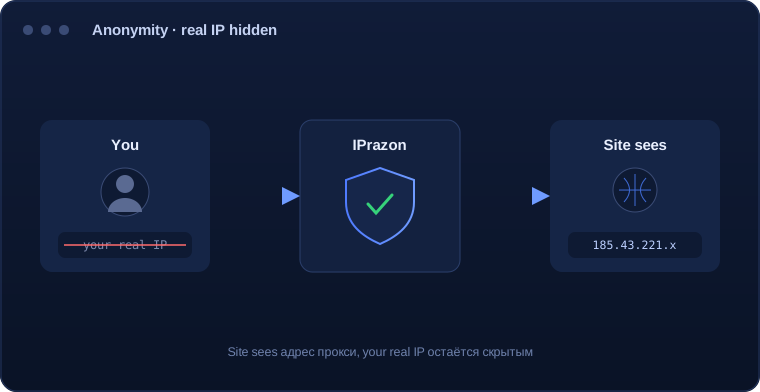
Anonymous proxies hide your real IP: the request goes through the proxy server, and the site sees the proxy address instead of yours. This is the core job of any proxy.
By anonymity level proxies fall into categories. High-anonymity (elite) proxies do not tell the site the connection goes through a proxy and do not pass your real address in headers. The IPrazon datacenter pool works exactly this way.
Anonymity here is about the privacy of your infrastructure during data collection and automation, not about anything unlawful. The pool addresses are private and do not appear in public lists.
Setup is standard and takes a couple of minutes:
For extra privacy use rotation: a new IP on schedule or on demand makes it harder to link requests together.
| Parameter | Value |
|---|---|
| What the site sees | An address from the proxy pool |
| How to check | Any IP checking service should show the proxy address |
| Output format | IP:PORT is the main one. IP:PORT:LOGIN:PASS is the second option |
| Pool type | Private datacenter IPv4, clients only |
| Rotation | Automatic inside a 12,000 address pool |
| Protocols | SOCKS5 and HTTP/HTTPS, SOCKS5 leaves no DNS leaks |
| Threads | Up to 3000 depending on plan |
| Traffic | Unlimited |
| Connection | Bind your IP in the dashboard for the IP:PORT format |
| Test | Free test up to 2 hours |
For maximum anonymity pick SOCKS5, it routes DNS requests through the proxy as well.
Proxies split into three levels by what they add to a request. A transparent one passes your original address in service headers, so the site sees both the proxy and you. An anonymous one withholds the original address but signals that the connection runs through a proxy. A high-anonymity one adds nothing at all.
The difference comes down to a couple of service fields. In transparent mode headers appear carrying the original address, in anonymous mode only the proxy marker remains, and in high-anonymity mode the request looks like an ordinary direct one.
Checking takes a minute: open a service that echoes the headers it received and look for your real address and any proxy mention. Whatever that service sees, any platform sees too.
The address is only one signal. Alongside it go the user-agent string, the set and order of headers, language and time zone, TLS connection parameters, and in a browser also screen characteristics, fonts and rendering results.
Because of that, changing the address alone does not make a connection indistinguishable. If ten requests arrive from different IPs but carry an identical set of the remaining signals, they still add up to one recognisable profile.
The practical conclusion: address anonymity and connection anonymity are separate problems. The first is solved by the proxy, the second by configuring the software itself, and for technical work such as collecting open data the first is usually enough.
These two fields have historically been used by proxies to identify themselves. The first carries the original client address, the second details about the intermediate server. Both are added by the middleman.
If the request contains the first field with your real address, the proxy is called transparent: the site sees both the middleman and you, which leaves almost no point to the connection. If only the second is present, your address is hidden but the use of a proxy is obvious.
High-anonymity mode means neither field is added. The request looks like an ordinary direct one, and the service headers give no way to tell a middleman is present.
Checking needs no special tools: open a service that echoes received headers and look for your address and any proxy mentions. Whatever that service sees, any platform sees too.
The check has three steps and each closes its own layer. First: open an IP detection service and confirm it reports the proxy address. That is the basic address substitution test.
Second step: look at the service headers. Services that echo them show the whole set at once, and it is immediately visible whether the middleman attaches fields with your original address or a proxy marker.
The third step concerns name resolution. If DNS queries go around the proxy, your provider shows up in the results and the list of visited domains stays outside the tunnel. That layer is checked with a separate DNS test.
All three checks are worth running through the software the proxies will actually work in. Settings differ between programs, and a browser result says nothing about how your scraper or client behaves.
Anonymous datacenter proxies are used where it matters not to reveal your address:
Anonymous datacenter addresses are used for technical work: collecting open data, monitoring and checking results. Datacenter is for technical tasks.
The pool runs on our own hardware and consists of private addresses that are not sold one by one and do not appear in public lists. That is the practical basis of anonymity.
High-anonymity mode: the site sees only the proxy address. Rotation delivers new IPs on schedule or on demand, and traffic is unlimited. The pool holds 12,000 IPv4 addresses across 200+ countries.
HTTP, HTTPS and SOCKS5 are in every package, with login/password or IP authorization. SOCKS5 is handy where clean traffic passing matters.
I use them for data collection so as not to expose my server address. Runs stably, I set rotation myself.
Ran my tasks on the 2-hour trial, the site sees the proxy address, my IP is hidden. Good speed.
Private addresses, not from public lists, exactly what I needed. Support on Telegram replies to the point.
Before you pay we offer a free trial up to 2 hours. Connect the pool and confirm the site sees the proxy address while your real IP is hidden.
The request goes through the proxy server, and the site sees the proxy address. High-anonymity mode does not reveal that the connection goes through a proxy.
In high-anonymity mode, no. The site receives only the proxy address from the proxy pool, and your real address stays hidden.
The IPrazon datacenter pool works in high-anonymity mode: it does not pass your real address and does not flag the connection as a proxy in headers.
The pool addresses are private, not sold one by one and not in public lists, which is what provides anonymity in practice.
HTTP, HTTPS and SOCKS5 all work and are in the package. SOCKS5 is handy for clean traffic passing without changing headers.
For technical tasks and data collection, they do. Anonymous datacenter addresses are used for technical work and data collection.
A free trial is available up to 2 hours. Connect the pool and confirm your real IP is hidden before you pay.